
Acoustic Auralisation of the Auditorium
The Auditorium Auralisation application enables interactive listening to how an audio signal is perceived from different positions within the space. Users can choose from the available samples or upload their own audio file, and compare the original signal with the version as shaped by the acoustics of the department’s auditorium.
AuralisationRoom AcousticsImpulse Response
Overview
This interactive application allows users to listen to how different audio signals (e.g., speech, music, or individual musical instruments) are perceived from different listening positions within the auditorium. Users can select one of the available audio samples or upload their own audio file, in order to hear how it would sound if it were played from the stage while the listener is seated at a specific position in the hall.
To capture the acoustic behaviour of the auditorium, an omnidirectional dodecahedral loudspeaker was placed on the stage, and Impulse Response measurements were carried out at multiple listening positions throughout the space. Different audio samples were then convolved with the corresponding impulse responses, enabling the reproduction of how these sounds would be perceived from each listening position.
In the present implementation, distance attenuation from the sound source was not included, in order to focus the study primarily on the effects of reverberation and the frequency response of the room on the perceived quality of sound.
Clarity Index (C80) – Heatmaps
The Clarity index (C80) describes how clearly a sound is perceived within a space. It is based on the relationship between the direct sound that reaches the listener and the reflections produced by the room.
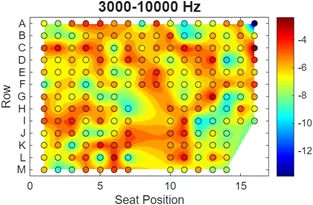
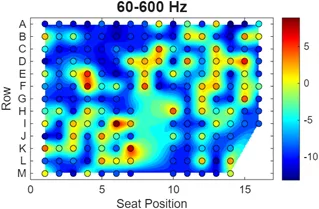
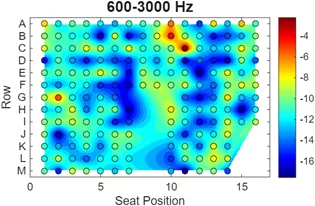
The heatmaps presented here illustrate the spatial distribution of clarity across the listening positions in the auditorium for three frequency bands:
- 60–600 Hz (low frequencies)
- 600–3000 Hz (mid frequencies)
- 3000–10000 Hz (high frequencies)
These visualizations show that the perceived clarity of sound can vary across different listening positions in the space, depending also on the spectral content of the audio signal.
Low frequencies (60–600 Hz)
This range includes elements such as bass or kick components in music. In certain positions within the auditorium, the rhythmic foundation of the sound may be reproduced more clearly than in others.
Mid frequencies (600–3000 Hz)
This region is particularly important for the intelligibility of human speech. Variations in clarity across the auditorium may therefore influence how clearly speech is perceived in situations such as lectures, presentations, or theatrical performances.
High frequencies (3000–10000 Hz)
This range contains fast transient characteristics of sound, such as instrument attacks or rapid rhythmic patterns. In many seating positions, a high degree of temporal clarity can be observed, which is especially important for musical genres with strong rhythmic elements.
Overall, the heatmaps provide a visual representation of how the acoustic experience changes throughout the auditorium, highlighting the relationship between listening position and the spectral characteristics of sound
Sound Examples
Users can select one of the available audio samples or upload their own audio file, in order to hear how it would sound if it were played from the stage while the listener is seated at a specific position in the hall.
The application supports most common audio formats such as WAV, MP3, FLAC, AIFF, and others. Uploaded files are automatically converted to mono, simulating a single sound source located at the center of the stage. This approach provides a more realistic representation of a situation in which a musical instrument or a speaker produces sound from a single position on stage.
After selecting an audio sample, users can click on any listening position in the auditorium to hear the signal as it would be shaped by the acoustic characteristics of the space.
Pressing Play starts playback, and users can switch between:
- Acoustics ON – the signal as it would be heard inside the auditorium
- Acoustics OFF (Dry) – the original signal without the acoustic influence of the room
This allows direct comparison between the original audio signal and the way it is modified by the reverberation and frequency response of the space. The application makes it possible to explore the acoustic experience of the auditorium for different types of audio content, such as lectures or musical performances and can be tested in the following link:
https://musicolab.hmu.gr/auralization/
Research Team
This project was carried out by the following students:
- Michalis Xiradakis
- Eugenia Palli
- Fotis Souvleris
Scientific Supervisor: Spyros Polychronopoulos, Assistant Professor